As a supplier of servo cables, I often receive inquiries from customers about how to connect a servo cable to a controller. This process, while it may seem daunting at first, is actually quite straightforward when you understand the basic principles and steps involved. In this blog post, I’ll guide you through the process, sharing my expertise and insights based on years of experience in the industry. Servo Cable
Understanding the Basics of Servo Cables and Controllers
Before we dive into the connection process, it’s important to have a clear understanding of what servo cables and controllers are and how they work together. A servo cable is a specialized cable designed to transmit electrical signals between a servo motor and a controller. The controller, on the other hand, is a device that sends commands to the servo motor, telling it how to move and operate.
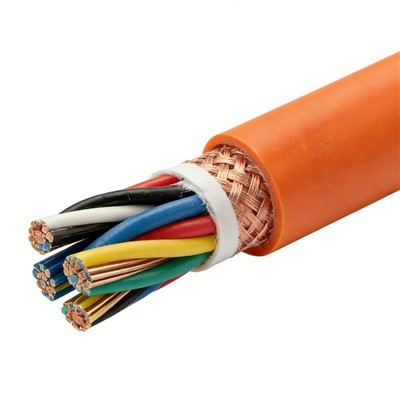
Servo cables typically have multiple wires, each serving a specific purpose. These wires carry power, signals, and feedback information between the motor and the controller. The controller uses these signals to control the position, speed, and torque of the servo motor.
Preparing for the Connection
The first step in connecting a servo cable to a controller is to gather all the necessary tools and materials. You’ll need a servo cable, a controller, a screwdriver (if required for the connection), and any other accessories that may be needed, such as cable ties or connectors.
It’s also important to ensure that the servo cable and the controller are compatible. Check the specifications of both the cable and the controller to make sure they have the same voltage, current, and signal requirements. Using incompatible components can lead to poor performance or even damage to the equipment.
Identifying the Wires
Once you have all the necessary tools and materials, the next step is to identify the wires in the servo cable. Most servo cables have color-coded wires, which makes it easier to identify their functions. However, the color coding may vary depending on the manufacturer, so it’s important to refer to the cable’s documentation or the manufacturer’s website for specific information.
Typically, the servo cable will have wires for power, ground, signal, and feedback. The power wires are usually red and black, with red being the positive terminal and black being the negative terminal. The signal wire is often white or yellow, and it carries the control signals from the controller to the servo motor. The feedback wire, which is usually green or blue, sends information about the motor’s position and speed back to the controller.
Connecting the Servo Cable to the Controller
Now that you’ve identified the wires, it’s time to connect the servo cable to the controller. The process may vary depending on the type of controller you’re using, but the general steps are as follows:
- Power Off: Before making any connections, make sure the controller and the servo motor are powered off. This will prevent any electrical shocks or damage to the equipment.
- Locate the Connection Ports: Find the connection ports on the controller that are designed for the servo cable. These ports are usually labeled with the corresponding wire colors or functions.
- Connect the Wires: Carefully connect each wire in the servo cable to the corresponding port on the controller. Make sure the connections are secure and tight to prevent any loose connections or short circuits.
- Secure the Cable: Once the wires are connected, use cable ties or other fastening methods to secure the cable to the controller. This will prevent the cable from moving or getting damaged during operation.
- Power On: After all the connections are made, power on the controller and the servo motor. Check the controller’s display or software to make sure the servo motor is functioning properly.
Troubleshooting Common Issues
Even if you follow the steps above, you may encounter some issues when connecting a servo cable to a controller. Here are some common issues and their solutions:
- No Power: If the servo motor doesn’t receive power, check the power connections to make sure they are secure. Also, check the power supply to make sure it is providing the correct voltage and current.
- No Signal: If the servo motor doesn’t respond to the control signals, check the signal connections to make sure they are properly connected. You may also need to check the controller’s settings to make sure it is sending the correct signals.
- Feedback Issues: If the controller is not receiving accurate feedback from the servo motor, check the feedback connections to make sure they are secure. You may also need to calibrate the feedback sensor to ensure accurate readings.
Conclusion
Connecting a servo cable to a controller is a relatively simple process, but it requires careful attention to detail and following the correct steps. By understanding the basics of servo cables and controllers, preparing for the connection, identifying the wires, and making the connections properly, you can ensure that your servo motor operates smoothly and efficiently.

If you have any questions or need further assistance with connecting a servo cable to a controller, please don’t hesitate to contact us. As a leading supplier of servo cables, we have the expertise and experience to help you find the right solutions for your needs. We offer a wide range of high-quality servo cables and accessories, and our team of experts is always available to provide technical support and guidance.
Coaxial Cable Whether you’re a hobbyist, an engineer, or a business owner, we can help you find the right servo cable for your application. Contact us today to learn more about our products and services, and let us help you take your project to the next level.
References
- Servo Motor Handbook, various editions
- Controller Manufacturer’s Manuals
- Industry Standards and Guidelines for Servo Systems
Cixi Davos Wire & Cable Co., Ltd.
As one of the most professional servo cable manufacturers and suppliers in China, we also support customized service. Please feel free to buy bulk high quality servo cable in stock here from our factory. For price consultation, contact us.
Address: No.3, Lane 91, Ruan Ding Road, Linxi Village, Xiaolin Town, Cixi City
E-mail: roy798@163.com
WebSite: https://www.cj-supplychain.com/
